# Redis 缓存穿透、击穿、雪崩解决方案
# 前言
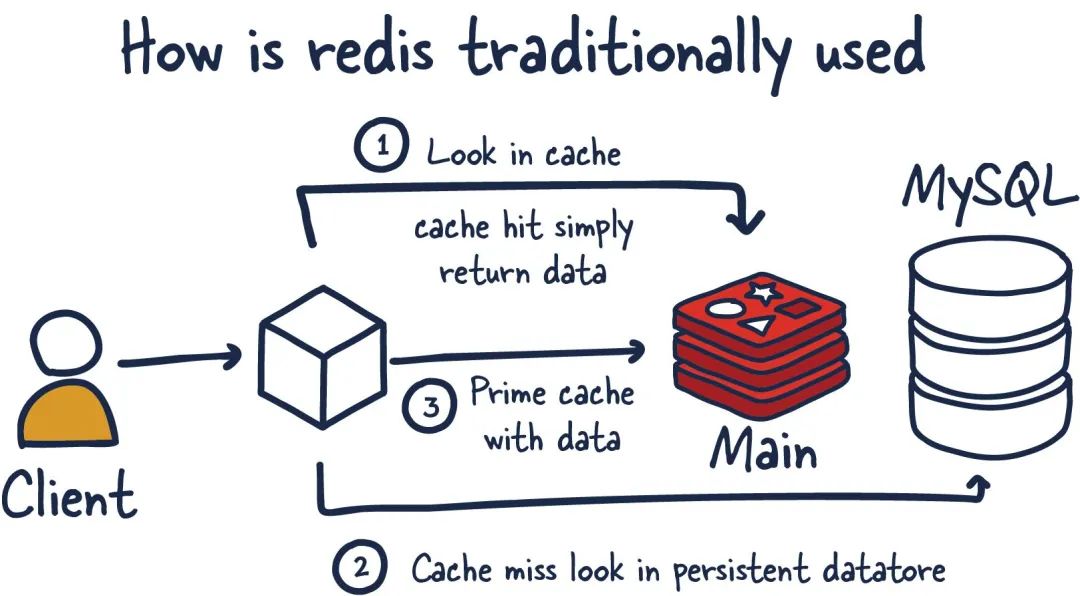
在使用 Redis 作为缓存时,我们经常会遇到三个经典问题:缓存穿透、缓存击穿和缓存雪崩。这些问题会导致大量请求直接访问数据库,给数据库带来巨大压力,甚至可能导致系统崩溃。本文将详细分析这三个问题的成因、危害以及相应的解决方案。
# 1. 缓存穿透
# 1.1 什么是缓存穿透
缓存穿透是指查询一个根本不存在的数据,缓存层和存储层都没有命中。在这种情况下,每次请求都会直接打到数据库,导致数据库压力骤增。
# 1.2 缓存穿透的场景
1
2
3
4
5
6
7
8
9
10
11
12
13
14
15
16
|
public User getUserById(Long userId) {
User user = redisTemplate.opsForValue().get("user:" + userId);
if (user != null) {
return user;
}
user = userMapper.selectById(userId);
if (user != null) {
redisTemplate.opsForValue().set("user:" + userId, user, 30, TimeUnit.MINUTES);
}
return user;
}
|
当恶意用户请求大量不存在的 userId 时,每次都会穿透缓存直接访问数据库。
# 1.3 缓存穿透的解决方案
# 方案一:缓存空对象
1
2
3
4
5
6
7
8
9
10
11
12
13
14
15
16
17
18
19
20
21
22
23
24
25
26
27
28
29
|
public User getUserById(Long userId) {
User user = redisTemplate.opsForValue().get("user:" + userId);
if (user != null) {
if (user.getId() == -1L) {
return null;
}
return user;
}
user = userMapper.selectById(userId);
if (user != null) {
redisTemplate.opsForValue().set("user:" + userId, user, 30, TimeUnit.MINUTES);
} else {
User emptyUser = new User();
emptyUser.setId(-1L);
redisTemplate.opsForValue().set("user:" + userId, emptyUser, 5, TimeUnit.MINUTES);
}
return user;
}
|
优点:
缺点:
- 需要额外的内存空间存储空值
- 可能导致数据不一致(空对象过期前,数据库新增了该数据)
# 方案二:布隆过滤器
1
2
3
4
5
6
7
8
9
10
11
12
13
14
15
16
17
18
19
20
21
22
23
24
25
26
27
28
29
30
31
32
33
34
35
36
37
38
39
40
41
42
43
44
45
46
47
48
49
50
51
52
53
54
55
56
57
58
59
60
61
62
63
64
65
66
67
68
69
70
71
72
73
74
75
|
@Component
public class BloomFilterService {
private BloomFilter<Long> userIdBloomFilter;
@PostConstruct
public void init() {
userIdBloomFilter = BloomFilter.create(
Funnels.longFunnel(),
1000000,
0.01
);
loadValidUserIds();
}
public boolean mightContain(Long userId) {
return userIdBloomFilter.mightContain(userId);
}
public void put(Long userId) {
userIdBloomFilter.put(userId);
}
private void loadValidUserIds() {
List<Long> userIds = userMapper.selectAllValidIds();
userIds.forEach(userIdBloomFilter::put);
}
}
@Service
public class UserService {
@Autowired
private BloomFilterService bloomFilterService;
public User getUserById(Long userId) {
if (!bloomFilterService.mightContain(userId)) {
return null;
}
User user = redisTemplate.opsForValue().get("user:" + userId);
if (user != null) {
return user;
}
user = userMapper.selectById(userId);
if (user != null) {
redisTemplate.opsForValue().set("user:" + userId, user, 30, TimeUnit.MINUTES);
}
return user;
}
}
|
优点:
缺点:
- 存在误判率(但不会漏判)
- 需要维护布隆过滤器
- 不适合动态数据场景
# 2. 缓存击穿
# 2.1 什么是缓存击穿
缓存击穿是指一个热点 key 在失效的瞬间,大量并发请求同时访问这个 key,导致所有请求都直接打到数据库上。
# 2.2 缓存击穿的场景
1
2
3
4
5
6
7
8
9
10
11
|
public Product getProductById(Long productId) {
Product product = redisTemplate.opsForValue().get("product:" + productId);
if (product == null) {
product = productMapper.selectById(productId);
redisTemplate.opsForValue().set("product:" + productId, product, 30, TimeUnit.MINUTES);
}
return product;
}
|
# 2.3 缓存击穿的解决方案
# 方案一:互斥锁(分布式锁)
1
2
3
4
5
6
7
8
9
10
11
12
13
14
15
16
17
18
19
20
21
22
23
24
25
26
27
28
29
30
31
32
33
34
35
36
37
38
39
40
41
42
43
44
45
46
47
48
49
50
51
52
53
54
55
56
57
58
59
60
61
|
public Product getProductById(Long productId) {
Product product = redisTemplate.opsForValue().get("product:" + productId);
if (product != null) {
return product;
}
String lockKey = "lock:product:" + productId;
String lockValue = UUID.randomUUID().toString();
try {
Boolean locked = redisTemplate.opsForValue().setIfAbsent(
lockKey, lockValue, 30, TimeUnit.SECONDS);
if (locked) {
product = redisTemplate.opsForValue().get("product:" + productId);
if (product == null) {
product = productMapper.selectById(productId);
if (product != null) {
redisTemplate.opsForValue().set("product:" + productId, product, 30, TimeUnit.MINUTES);
}
}
} else {
Thread.sleep(100);
return getProductById(productId);
}
} catch (InterruptedException e) {
Thread.currentThread().interrupt();
} finally {
releaseLock(lockKey, lockValue);
}
return product;
}
private void releaseLock(String lockKey, String lockValue) {
String luaScript =
"if redis.call('get', KEYS[1]) == ARGV[1] then " +
" return redis.call('del', KEYS[1]) " +
"else " +
" return 0 " +
"end";
redisTemplate.execute(
new DefaultRedisScript<>(luaScript, Long.class),
Collections.singletonList(lockKey),
lockValue
);
}
|
# 方案二:逻辑过期
1
2
3
4
5
6
7
8
9
10
11
12
13
14
15
16
17
18
19
20
21
22
23
24
25
26
27
28
29
30
31
32
33
34
35
36
37
38
39
40
41
42
43
44
45
46
47
48
49
50
51
52
53
54
55
56
57
58
59
60
61
|
@Data
public class CacheData<T> {
private T data;
private LocalDateTime expireTime;
}
public Product getProductById(Long productId) {
CacheData<Product> cacheData = redisTemplate.opsForValue().get("product:" + productId);
if (cacheData != null) {
if (cacheData.getExpireTime().isAfter(LocalDateTime.now())) {
return cacheData.getData();
}
String lockKey = "lock:product:" + productId;
String lockValue = UUID.randomUUID().toString();
Boolean locked = redisTemplate.opsForValue().setIfAbsent(
lockKey, lockValue, 10, TimeUnit.SECONDS);
if (locked) {
CompletableFuture.runAsync(() -> {
try {
Product product = productMapper.selectById(productId);
CacheData<Product> newCacheData = new CacheData<>();
newCacheData.setData(product);
newCacheData.setExpireTime(LocalDateTime.now().plusMinutes(30));
redisTemplate.opsForValue().set("product:" + productId, newCacheData);
} finally {
releaseLock(lockKey, lockValue);
}
});
}
return cacheData.getData();
}
Product product = productMapper.selectById(productId);
if (product != null) {
CacheData<Product> newCacheData = new CacheData<>();
newCacheData.setData(product);
newCacheData.setExpireTime(LocalDateTime.now().plusMinutes(30));
redisTemplate.opsForValue().set("product:" + productId, newCacheData);
}
return product;
}
|
# 3. 缓存雪崩
# 3.1 什么是缓存雪崩
缓存雪崩是指大量 key 在同一时间集体失效,或者 Redis 服务宕机,导致大量请求直接访问数据库,造成数据库压力剧增。
# 3.2 缓存雪崩的场景
- 大量 key 同时过期:系统启动时批量设置了相同的过期时间
- Redis 服务宕机:服务器故障、网络问题等
- 缓存服务器重启:维护操作或系统重启
# 3.3 缓存雪崩的解决方案
# 方案一:过期时间随机化
1
2
3
4
5
6
7
8
9
10
11
12
13
14
15
16
17
18
19
20
21
22
23
24
25
26
27
28
29
30
31
32
33
|
public void setProductCache(Long productId, Product product) {
long baseExpireTime = 30 * 60;
long randomOffset = (long) (Math.random() * 5 * 60);
long totalExpireTime = baseExpireTime + randomOffset;
redisTemplate.opsForValue().set("product:" + productId, product, totalExpireTime, TimeUnit.SECONDS);
}
public void batchSetProductCache(Map<Long, Product> productMap) {
Map<String, Product> cacheMap = new HashMap<>();
productMap.forEach((productId, product) -> {
String key = "product:" + productId;
cacheMap.put(key, product);
long baseExpireTime = 30 * 60;
long randomOffset = (long) (Math.random() * 10 * 60);
long totalExpireTime = baseExpireTime + randomOffset;
redisTemplate.opsForValue().set(key, product, totalExpireTime, TimeUnit.SECONDS);
});
}
|
# 方案二:缓存预热
1
2
3
4
5
6
7
8
9
10
11
12
13
14
15
16
17
18
19
20
21
22
23
24
25
26
27
28
29
30
31
32
33
34
35
36
37
38
39
40
41
42
43
44
45
46
47
48
49
50
51
52
53
54
55
56
57
58
59
60
61
62
63
64
65
66
67
68
69
70
71
72
73
74
75
76
77
78
79
80
81
82
83
84
85
86
87
88
|
@Component
public class CacheWarmupService {
@Autowired
private ProductService productService;
@Autowired
private RedisTemplate<String, Object> redisTemplate;
@PostConstruct
public void warmupCache() {
log.info("开始缓存预热...");
warmupHotProducts();
warmupHotUsers();
warmupConfigData();
log.info("缓存预热完成");
}
private void warmupHotProducts() {
List<Long> hotProductIds = productService.getHotProductIds();
hotProductIds.parallelStream().forEach(productId -> {
try {
Product product = productService.getProductById(productId);
if (product != null) {
redisTemplate.opsForValue().set(
"product:" + productId,
product,
2, TimeUnit.HOURS
);
}
} catch (Exception e) {
log.error("预热商品{}失败", productId, e);
}
});
}
@Scheduled(fixedRate = 30 * 60 * 1000)
public void scheduledWarmup() {
warmupExpiringSoonData();
}
private void warmupExpiringSoonData() {
Set<String> expiringKeys = redisTemplate.keys("product:*");
expiringKeys.parallelStream().forEach(key -> {
Long ttl = redisTemplate.getExpire(key, TimeUnit.SECONDS);
if (ttl != null && ttl < 300) {
String productId = key.split(":")[1];
try {
Product product = productService.getProductById(Long.parseLong(productId));
if (product != null) {
redisTemplate.opsForValue().set(key, product, 2, TimeUnit.HOURS);
}
} catch (Exception e) {
log.error("重新预热{}失败", key, e);
}
}
});
}
}
|
# 方案三:高可用架构
1
2
3
4
5
6
7
8
9
10
11
12
13
14
15
16
17
18
19
20
21
22
23
24
25
26
27
28
29
30
31
32
33
34
35
36
37
38
39
40
41
42
43
44
45
46
47
48
49
50
51
52
53
54
55
56
57
58
59
60
61
62
63
64
65
66
67
68
69
70
71
72
73
74
75
76
77
78
79
80
81
82
83
84
85
86
87
|
@Configuration
public class RedisConfig {
@Bean
public LettuceConnectionFactory redisConnectionFactory() {
RedisSentinelConfiguration sentinelConfig = new RedisSentinelConfiguration()
.master("mymaster")
.sentinel("192.168.1.101", 26379)
.sentinel("192.168.1.102", 26379)
.sentinel("192.168.1.103", 26379)
.setPassword("yourpassword");
return new LettuceConnectionFactory(sentinelConfig);
}
@Bean
public RedisClusterConfiguration redisClusterConfiguration() {
RedisClusterConfiguration clusterConfig = new RedisClusterConfiguration();
clusterConfig.clusterNode("192.168.1.101", 6379);
clusterConfig.clusterNode("192.168.1.102", 6379);
clusterConfig.clusterNode("192.168.1.103", 6379);
clusterConfig.setPassword("yourpassword");
return clusterConfig;
}
}
@Service
public class MultiLevelCacheService {
@Autowired
private RedisTemplate<String, Object> redisTemplate;
@Autowired
private CaffeineCache localCache;
public Product getProductById(Long productId) {
String key = "product:" + productId;
Product product = localCache.getIfPresent(key);
if (product != null) {
return product;
}
try {
product = (Product) redisTemplate.opsForValue().get(key);
if (product != null) {
localCache.put(key, product);
return product;
}
} catch (Exception e) {
log.warn("Redis缓存异常,降级到数据库查询", e);
}
product = productMapper.selectById(productId);
if (product != null) {
try {
redisTemplate.opsForValue().set(key, product, 30, TimeUnit.MINUTES);
} catch (Exception e) {
log.warn("写入Redis缓存失败", e);
}
localCache.put(key, product);
}
return product;
}
}
|
# 4. 监控与告警
# 4.1 缓存监控指标
1
2
3
4
5
6
7
8
9
10
11
12
13
14
15
16
17
18
19
20
21
22
23
24
25
26
27
28
29
30
31
32
33
34
35
36
37
38
39
40
41
42
43
44
45
46
47
48
49
50
51
52
53
54
55
56
57
58
59
60
61
62
63
64
65
66
67
68
69
70
71
72
73
74
75
76
77
78
79
80
81
82
83
84
85
86
87
88
89
90
91
92
93
94
95
96
97
98
99
100
101
102
103
104
|
@Component
public class CacheMonitorService {
@Autowired
private RedisTemplate<String, Object> redisTemplate;
public double getCacheHitRate() {
Properties info = redisTemplate.getConnectionFactory()
.getConnection()
.info();
long hits = Long.parseLong(info.getProperty("keyspace_hits", "0"));
long misses = Long.parseLong(info.getProperty("keyspace_misses", "0"));
return hits + misses == 0 ? 0.0 : (double) hits / (hits + misses);
}
public Map<String, Object> getMemoryInfo() {
Properties info = redisTemplate.getConnectionFactory()
.getConnection()
.info("memory");
Map<String, Object> memoryInfo = new HashMap<>();
memoryInfo.put("used_memory", info.getProperty("used_memory"));
memoryInfo.put("used_memory_human", info.getProperty("used_memory_human"));
memoryInfo.put("used_memory_rss", info.getProperty("used_memory_rss"));
memoryInfo.put("used_memory_peak", info.getProperty("used_memory_peak"));
memoryInfo.put("maxmemory", info.getProperty("maxmemory"));
return memoryInfo;
}
public int getConnectedClients() {
Properties info = redisTemplate.getConnectionFactory()
.getConnection()
.info("clients");
return Integer.parseInt(info.getProperty("connected_clients", "0"));
}
}
@Component
public class CacheAlertService {
@Autowired
private CacheMonitorService monitorService;
@Scheduled(fixedRate = 60 * 1000)
public void checkCacheHealth() {
try {
double hitRate = monitorService.getCacheHitRate();
if (hitRate < 0.8) {
sendAlert("缓存命中率过低: " + String.format("%.2f%%", hitRate * 100));
}
Map<String, Object> memoryInfo = monitorService.getMemoryInfo();
long usedMemory = Long.parseLong(memoryInfo.get("used_memory").toString());
long maxMemory = Long.parseLong(memoryInfo.get("maxmemory").toString());
if (maxMemory > 0 && (double) usedMemory / maxMemory > 0.9) {
sendAlert("Redis内存使用率过高: " + String.format("%.2f%%", (double) usedMemory / maxMemory * 100));
}
int connectedClients = monitorService.getConnectedClients();
if (connectedClients > 1000) {
sendAlert("Redis连接数过高: " + connectedClients);
}
} catch (Exception e) {
sendAlert("缓存监控异常: " + e.getMessage());
}
}
private void sendAlert(String message) {
log.error("缓存告警: {}", message);
}
}
|
# 5. 最佳实践总结
# 5.1 架构设计原则
- 分层缓存:本地缓存 + 分布式缓存
- 降级策略:缓存不可用时的备选方案
- 监控告警:实时监控缓存状态
- 容错处理:异常情况下的优雅降级
# 5.2 代码规范
1
2
3
4
5
6
7
8
9
10
11
12
13
14
15
16
17
18
19
20
21
22
23
24
25
26
27
28
29
30
31
32
33
34
35
36
37
38
39
40
41
42
43
44
45
46
47
48
49
50
51
52
53
54
55
56
57
58
59
60
61
62
63
|
@Service
public class CacheService {
@Autowired
private RedisTemplate<String, Object> redisTemplate;
@Autowired
private CacheMonitorService monitorService;
public <T> T get(String key, Class<T> clazz, Supplier<T> dataLoader,
long expireTime, TimeUnit timeUnit) {
try {
T data = (T) redisTemplate.opsForValue().get(key);
if (data != null) {
return data;
}
T result = dataLoader.get();
if (result != null) {
redisTemplate.opsForValue().set(key, result, expireTime, timeUnit);
}
return result;
} catch (Exception e) {
log.error("缓存操作异常,key: {}", key, e);
return dataLoader.get();
}
}
public <T> Map<String, T> multiGet(Collection<String> keys, Class<T> clazz) {
try {
List<Object> values = redisTemplate.opsForValue().multiGet(keys);
Map<String, T> result = new HashMap<>();
int index = 0;
for (String key : keys) {
Object value = values.get(index++);
if (value != null) {
result.put(key, (T) value);
}
}
return result;
} catch (Exception e) {
log.error("批量缓存查询异常", e);
return Collections.emptyMap();
}
}
}
|
# 5.3 性能优化
- 连接池配置:合理配置连接池参数
- 序列化优化:使用高效的序列化方式
- 批量操作:减少网络往返次数
- Pipeline:使用管道提高吞吐量
1
2
3
4
5
6
7
8
9
10
11
12
13
14
15
16
17
18
19
20
21
22
23
24
25
26
27
28
29
30
31
32
33
34
35
36
37
38
39
40
41
42
|
@Configuration
public class RedisPerformanceConfig {
@Bean
public LettuceConnectionFactory lettuceConnectionFactory() {
GenericObjectPoolConfig<StatefulRedisConnection<String, String>> poolConfig =
new GenericObjectPoolConfig<>();
poolConfig.setMaxTotal(20);
poolConfig.setMaxIdle(10);
poolConfig.setMinIdle(5);
poolConfig.setMaxWaitMillis(3000);
LettuceClientConfiguration clientConfig = LettucePoolingClientConfiguration.builder()
.poolConfig(poolConfig)
.commandTimeout(Duration.ofSeconds(2))
.shutdownTimeout(Duration.ZERO)
.build();
return new LettuceConnectionFactory(
new RedisStandaloneConfiguration("localhost", 6379),
clientConfig);
}
public void batchSetData(Map<String, Object> dataMap, long expireTime, TimeUnit timeUnit) {
redisTemplate.executePipelined(new RedisCallback<Object>() {
@Override
public Object doInRedis(RedisConnection connection) throws DataAccessException {
dataMap.forEach((key, value) -> {
connection.set(key.getBytes(), SerializationUtils.serialize(value));
connection.expire(key.getBytes(), timeUnit.toSeconds(expireTime));
});
return null;
}
});
}
}
|
# 6. 总结
缓存穿透、击穿、雪崩是 Redis 使用过程中的常见问题,需要从架构设计、代码实现、监控告警等多个维度进行综合考虑:
# 6.1 问题对比
| 问题类型 | 成因 | 解决方案 | 适用场景 |
|---|
| 缓存穿透 | 查询不存在的数据 | 缓存空对象、布隆过滤器 | 防恶意攻击 |
| 缓存击穿 | 热点 key 过期 | 互斥锁、逻辑过期 | 热点数据保护 |
| 缓存雪崩 | 大量 key 同时失效 | 随机过期、缓存预热、高可用 | 系统稳定性 |
# 6.2 最佳实践
- 预防为主:通过合理的设计避免问题发生
- 监控告警:及时发现和处理异常情况
- 降级策略:确保系统在异常情况下的可用性
- 性能优化:持续优化缓存性能
通过以上措施,可以有效解决 Redis 缓存中的三大问题,构建稳定、高效的缓存系统。